!!
#Alien#
The Alien project demonstrates how to combine traditional frame-by-frame animation with the advanced animation tools provided by Spine. In this project, only a few frame-by-frame images were drawn by hand, then they were augmented by Spine's [mesh deformation](/spine-meshes#Deformation) and smooth interpolation. The `death` animation uses these techniques in multiple places: the bursting head, the popping eye, and the green slime splat. [Transform constraints](/spine-transform-constraints) were used to detach the jaw.
The Alien can be seen in action in the [Super Spineboy](https://github.com/EsotericSoftware/spine-superspineboy) demo game. For variety, the aliens are each given a slightly different hue. Also, 4 different sizes are used for aliens of different strength. When the largest alien dies, it explodes and spawns many tiny aliens.
## Head burst
### Setup

The head is modeled by a single bone called `head` that contains two slots: `head` and `burst-bg`.
The `head` [slot](/spine-basic-concepts#Slots) contains four attachments: `head`, `burst01`, `burst02`, and `burst03-fg`. Each of these attachments is a [mesh](/spine-meshes) attachment pointing to a different image. The `head` attachment is used by all animations. It is the default "unburst" state of the Alien head. The `burst01`, `burst02`, and `burst03-fg` attachments are 3 frames of the bursting head. Together with the `head` attachment, they make up the keyframes of a traditional frame-by-frame animation.
The `burst03-bg` attachment in the slot `burst-bg` adds some extra slimy green burstiness to the animation.
Note that the eye, jaw, and green slime splat are not part of the head bone hierarchy. These are kept separate to ease the animation process. This is also reflected in the [draw order](/spine-images#Draw-order) of the respective slots.
### Animation
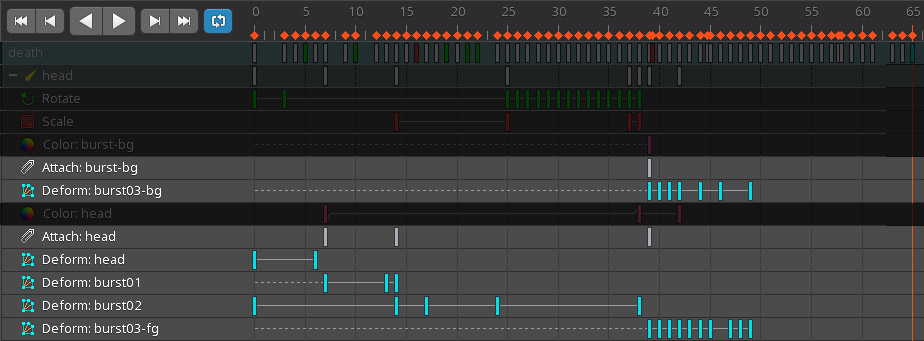
Above, the [timelines](/spine-dopesheet#Timeline) making up the head bursting part of the `death` animation are shown in the [dopesheet](/spine-dopesheet#Dopesheet-view) in `Animate` mode. The attachment timeline for the head slot (`Attach: head`) contains a key for every [attachment change](/spine-key-frames#Attachments) in the `head` slot. The animation starts with the `head` attachment in the slot, then switches through the `burst01`, `burst02`, and `burst03-fg` attachments. These keys are akin to traditional frame-by-frame animation. In frame `39`, the `burst03-bg` attachment is keyed and becomes visible, adding green slime behind the bursting head attachment.
The frame-by-frame animation is made more interesting by [deforming](/spine-meshes#Deformation) the mesh attachments, as shown in the deform timelines.
## Jaw and eye
### Setup
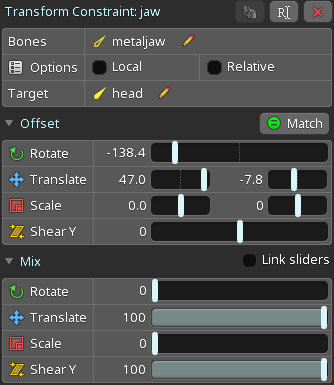
The bones for the jaw (`metaljaw`) and eye (`eye-root`) are not parented to the `head` bone but to the `root` bone of the skeleton. This allows for independent movement, making it easier to animate detaching the jaw and eye from the head in the `death` animation.
The jaw and eye bone are made to follow the head bone using [transform constraints](/spine-transform-constraints). The transform constraints' offsets and mix values are set so that the jaw and eye by default follow the head bone's movement, effectively behaving like a normal parent/child relationship.
When the jaw and eye no longer need to follow the head bone, such as when the jaw flies into the air in the `death` animation, the [mix](/spine-transform-constraints#Mix) values of these transform constraints are set to `0`, allowing the constrained bones to move freely based on their own transforms.
### Animation

To detach the jaw and eye from the head for the `death` animation, the influence of the transform constraint on the bone transform is reduced by keying the transform constraint mixes accordingly. The mixes are animated in the timelines `Transform: eye-root`, `Transform: jaw`, and `Transform: eye`.